Calculator Flows
A flow is your own calculator: enter a handful of inputs and derive everything you need. Under the hood it's an ordered list of cells over one shared namespace of named values, recomputed live on every edit and checked by a real dimensional-analysis engine.
Build a flow →The model
Every cell produces a named value and may consume others. The evaluator indexes producers, builds a dependency graph, detects cycles, topologically orders the cells, and computes each one — surfacing per-cell errors without aborting the rest of the sheet. Order on screen doesn't matter; dependency order does.
The editor is split into two sections over the same namespace: an Inputs panel where you set values once, and a Calculations section of formulas and expressions that read them.
Cell types
Input
A named, unit-typed value. Units are chosen from a categorized picker with full names (millifarads (mF), microhenries (µH)) — a capacitance field only offers capacitance units, so you can't accidentally enter °F for a capacitor. The parsed value is echoed in a readable, auto-scaled unit.
Formula
Any of the 438 library formulas across 32 categories. Pick one and the inputs it needs appear automatically in the panel, named and unit-typed; choose which variable to solve for, and bind each remaining variable to a flow value (push a result through) or an inline literal with dimension-correct units. Two formulas that share a variable name get their own distinct inputs by default — point a binding at the other's value to share instead.
Expression
Your own maths over the named values — 2*pi*f0*L, sqrt(R^2 + (XL-XC)^2). Supports + - * / ^, functions (sqrt, sin, cos, …), and constants (pi, e). The variables it references that aren't defined yet become inputs with one click.
The dimensional engine
Every quantity carries a dimension, not just a unit label — a vector over the five SI base dimensions [m, kg, s, A, K]. Arithmetic propagates dimension and rejects nonsense:
3 V × 2 A      → 6 W          // dimensions add
V / A          → Ω
√(H · F)       → s            // LC time constant
V + A          → DIMENSION_MISMATCH
Results auto-scale to the unit that reads cleanest (339.32 kHz, not 0.00033932 MHz), and you can switch the display unit per result. Displayed numbers group thousands as a visual gap only — copy or select and you get clean digits with no comma/period ambiguity.
Worked example — an LC tank
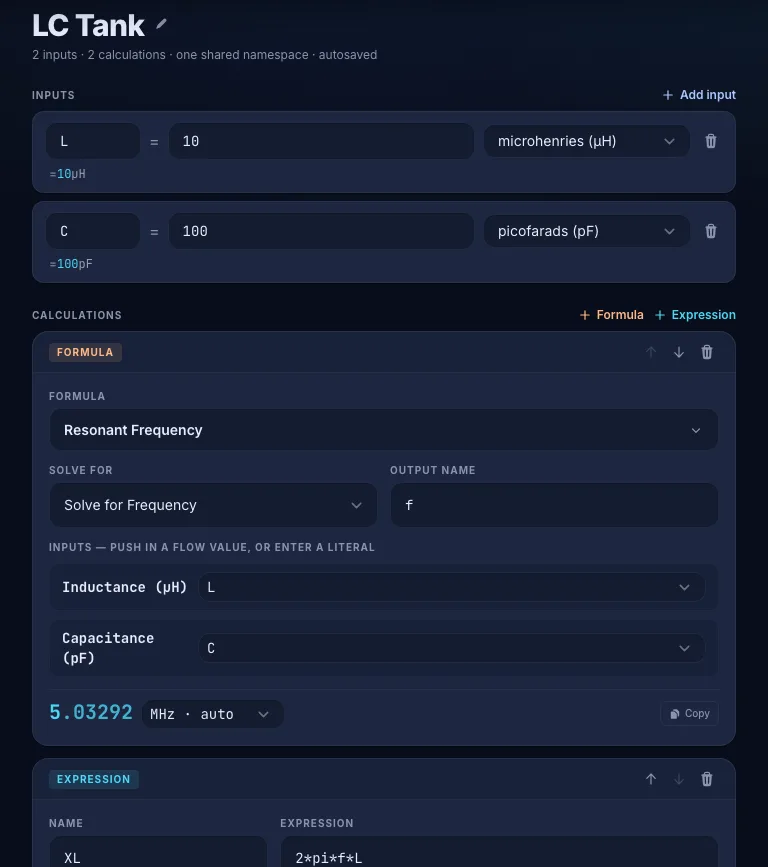
Input the components, drop in a formula, then layer an expression on its result:
input   L = 10 µH
input   C = 100 pF

formula Resonant Frequency · solve f
        f0 = 1 / (2π√(LC))
        → 5.03292 MHz

expr    XL = 2*pi*f0*L
        → 316.228 Ω   (Hz·H reduces to Ω — checked)
Change L and everything downstream recomputes instantly. f0 is a real quantity in hertz, so the expression's dimensional reduction to ohms is verified, not assumed.
Per-cell errors
Errors are local — a broken cell never takes down the sheet. You'll see, inline on the offending cell:
- Dimension mismatch — e.g. adding an inductance to a capacitance.
- Cycle — a value that (transitively) depends on itself.
- Duplicate name — two cells producing the same name.
- Unknown identifier — an expression referencing a name nothing defines.
- Non-finite — a divide-by-zero or overflow.
A formula whose inputs simply aren't filled yet shows a calm “enter the inputs above” hint, not a red error.
Saving & sync
Flows autosave to your browser as you type. Sign in with a free account and they sync to the cloud — every flow available on every device, alongside your projects and formula history.
Next steps
- Open Flows in the app
- Browse the 438-formula library — every formula is addable to a flow
- Getting Started — the battery-life model
Keep your flows everywhere
A free account syncs flows, projects, and formula history across devices.
Create a free account